Skip to content

We use cookies for a better experience. Enable ads to help keep Toonade free.

Privacy
Toonade

Token-Oriented Object Notation

Convert JSON to TOON

Transform your JSON data into clean, human-readable TOON format with our modern, fast, and intuitive converter. Perfect for LLM prompts.

Input

Paste your JSON here...

Output

Paste your TOON format here...

Paste your TOON format here...

How to convert JSON to TOON

Paste or upload your JSON above and click Convert. Toonade turns it into TOON (Token-Oriented Object Notation) right in your browser and shows how many tokens you save. Paste the result into your prompt to send the same data to an LLM for less.

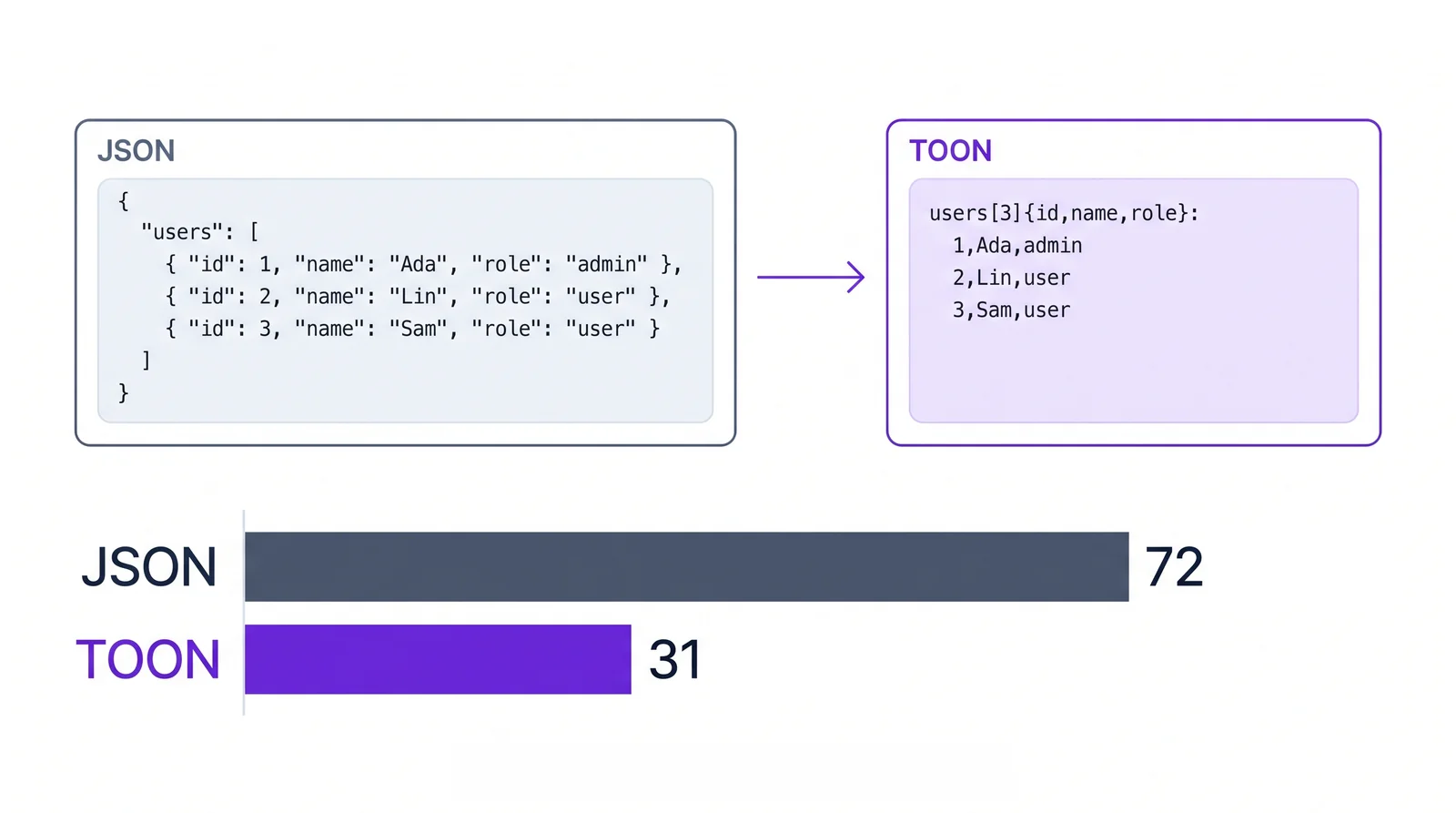
The same three users as JSON and as TOON. The JSON repeats the keys id, name and role in every object and takes 72 tokens. The TOON version names the fields once in a header and writes one line per user: 31 tokens, 57% fewer.
The same three users take 72 tokens as JSON and 31 as TOON: 57% fewer. Counted with the o200k_base tokenizer, the one the token calculator uses.

Convert in three steps

Paste JSON into the input or upload a .json file, click Convert, then copy or download the TOON output. The stats under the converter compare tokens and size for both versions. Need the original back? The TOON to JSON converter decodes it again.

How many tokens does TOON save?

It depends on the shape of your data. In our test fixtures, TOON uses about 60% fewer tokens than pretty-printed JSON for arrays of objects that share the same fields, and 25-35% fewer for nested or mixed data. Against minified JSON it still wins on tables but can be larger for deeply nested objects, so check your own payload with the token calculator.

What TOON looks like

TOON keeps JSON's data model but drops repeated keys and most punctuation. Nested objects use indentation like YAML, and an array of uniform objects becomes a table with a single header, such as items[2]{sku,qty,price}: followed by one row per item. The TOON format guide covers the full syntax.

Frequently asked questions

Is the conversion lossless?
Yes. TOON represents the same data as JSON, so converting back returns identical data, including numbers, booleans, nulls and nested structures.
Which LLMs can read TOON?
Any model that reads text, including GPT, Claude, Gemini and Llama. For best results, say in your prompt that the data is in TOON format.
Is my JSON uploaded anywhere?
No. Conversion runs entirely in your browser, so your data stays on your device. The only exception is a share link, which carries the data in its URL.
How is TOON different from CSV or YAML?
It combines the two: CSV-style rows for uniform arrays and YAML-style indentation for nested objects, plus explicit array lengths and field names that help models read the data reliably.
Can I convert JSON to TOON in code?
Yes. The official @toon-format/toon package encodes and decodes TOON in JavaScript and TypeScript. See the code examples for Node.js, Python, React and API usage.